

Measuring Tools
Fluke 369 True-rms Leakage Current Clamp Meter
Reduced downtime - find current leaks without shutting down equipment
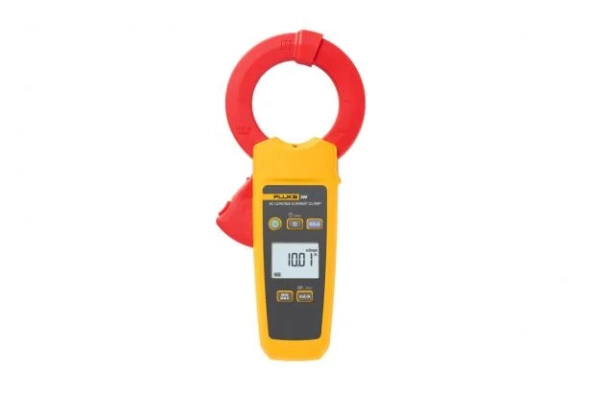
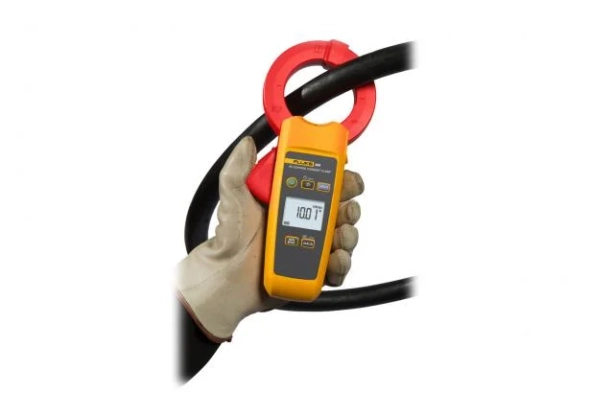
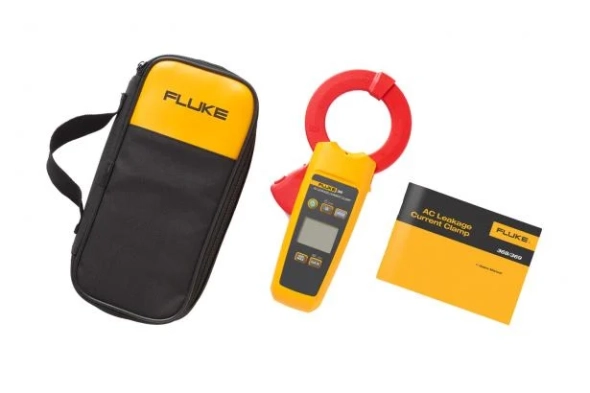
The Fluke 369 FC true-rms leakage current clamp meter helps users detect, document, record, and compare leakage current readings over time to prevent unexpected downtime, and identify intermittent trips of GFCI and RCDs, all without the need to turn the equipment off.
The Fluke 369 FC has a very large 61 mm clamp for working with extra large conductors. The clamps are fully coated so that they can accurately capture very small leakage signals, and can minimize external electromagnetic interference.
The Fluke 369 FC true-rms leakage current clamp meter helps users detect, document, record, and compare leakage current readings over time to prevent unexpected downtime, and identify intermittent trips of GFCI and RCDs, all without the need to turn the equipment off.
The Fluke 369 FC has a very large 61 mm clamp for working with extra large conductors. The clamps are fully coated so that they can accurately capture very small leakage signals, and can minimize external electromagnetic interference.
Download
Produk Lainnya
Automatic measurements. More flexibility. Better power quality troubleshooting.
Fluke 1770 Series Three-Phase Power Quality Analyzers eliminate the complexities of power quality logging, troubleshooting, and analysis. Engineered to be the faster, easier way to perform power quality studies, the 1770 Series offers automatic measurements, a straightforward user interface and setup, best-in-class specifications, and a simplified reporting platform. The instrument can also be powered directly from the measurement circuit, eliminating the need to find a power outlet or use a lengthy extension cord.
With the 1770 Series you’ll never miss a critical power quality event—from fast transients up to 8 kV, harmonics up to 30 kHz, dips and swells, as well as the voltage, current, and power measurements that enable you to characterize your electrical system.
Automatic measurement capture
Whether you’re performing a quick system check or a detailed power quality study, consistent data is key. The Fluke 1770 Series offers a unique automatic measurement capture system that helps ensure you’re collecting the right data every time, while still giving you the flexibility to select and adjust specific parameters as needed. More than 500 power quality parameters are captured by default and the guided setup makes it easy to select the right parameters for the system you’re working on. Logged data is instantly viewable, downloadable, and shareable with Fluke Energy Analyze Plus software so you never need to wait to finish a session before reviewing results or analyzing data.
Ultimate measurement confidence
The Fluke 1770 Series are 2-in-1 devices that combine the troubleshooting functionality of a power quality meter with the robust analysis and logging capabilities of a standalone power quality analyzer—in a single, easy-to-use, handheld device.
The ‘PQ Meter’ function gives you immediate access to live onscreen data in the field so you can quickly identify potential problems while troubleshooting. The detailed ‘PQ Logging and Analysis’ function eliminates the complexity of performing power quality studies by guiding you through the setup process ensuring you’re capturing the right data every time. Couple these measurement modes with a unique measurement connection autocorrect function and you can be confident that you never need to worry about going back for a second measurement—even if you were unsure about what to look for when you started.
Powerful analysis software with easy-to-create reports
Fluke 1770 Series Power Quality Analyzers come standard with the powerful Fluke Energy Analyze Plus software, designed to eliminate the hassles found with other multi-purpose application software. Energy Analyze Plus helps you evaluate power quality data right out of the box and without extensive training.
Energy Analyze Plus makes downloading, analyzing, tracking, and reporting power quality and energy data easier than ever. Quickly compare results to historical values, benchmark against industry norms, compare measured data to local conditions, and create a more complete picture of what’s occurring across your facility, even as the data is still being collected. Energy Analyze Plus offers unified support for the Fluke 1730, 1740, and 1770 Series of Energy Loggers and Power Quality Analyzers.
“In-workshop” and “in-the-field” setup and download through PC application software
Simple data downloads using USB memory stick, WiFi, LTE, wired Ethernet, or USB cable
Analyze every measured detail of energy consumption and power quality state-of-health with automated reporting
One-touch reporting creates standardized reports conforming to standards like EN 50160, IEEE 519, GOST 33073 IEC 61000-2-2, or export data in PQDIF or NeQual compatible format or CSV for use with third-party software
Advanced analysis allows the user to choose any available logged parameter and create a highly customized view of measurements for advanced data correlation
High-speed voltage transient capture
Transients negatively impact otherwise healthy systems every day and their potential to damage your equipment can’t be underestimated. Whether your system is experiencing impulsive or oscillatory transients, the results can be devastating and cause problems ranging from insulation failures to total equipment failures. The Fluke 1775 and Fluke 1777 incorporate advanced transient capture technology to help you clearly identify high-speed voltage transients, so you have the data you need to stop them in their tracks. The Fluke 1775 Power Quality Analyzer has 1MHz sampling capability to capture fast transients, while the Fluke 1777 Power Quality Analyzer has 20MHz sampling capability to capture the fastest transients in high detail.
Compliant to international standards
The Fluke 1770 Series offers the best-in-class accuracy you’ve come to expect from a Fluke Power Quality Analyzer in a future IEC 61000-4-30 Class A edition 3 compliant package. On top of that, the 1770 Series has been engineered to meet the future requirements of Class A edition, for conformance to EN 50160 and IEEE 519, so you’ll be prepared to tackle tomorrow’s measurement requirements, today.
Fluke 1770 Series Three-Phase Power Quality Analyzers eliminate the complexities of power quality logging, troubleshooting, and analysis. Engineered to be the faster, easier way to perform power quality studies, the 1770 Series offers automatic measurements, a straightforward user interface and setup, best-in-class specifications, and a simplified reporting platform. The instrument can also be powered directly from the measurement circuit, eliminating the need to find a power outlet or use a lengthy extension cord.
With the 1770 Series you’ll never miss a critical power quality event—from fast transients up to 8 kV, harmonics up to 30 kHz, dips and swells, as well as the voltage, current, and power measurements that enable you to characterize your electrical system.
Automatic measurement capture
Whether you’re performing a quick system check or a detailed power quality study, consistent data is key. The Fluke 1770 Series offers a unique automatic measurement capture system that helps ensure you’re collecting the right data every time, while still giving you the flexibility to select and adjust specific parameters as needed. More than 500 power quality parameters are captured by default and the guided setup makes it easy to select the right parameters for the system you’re working on. Logged data is instantly viewable, downloadable, and shareable with Fluke Energy Analyze Plus software so you never need to wait to finish a session before reviewing results or analyzing data.
Ultimate measurement confidence
The Fluke 1770 Series are 2-in-1 devices that combine the troubleshooting functionality of a power quality meter with the robust analysis and logging capabilities of a standalone power quality analyzer—in a single, easy-to-use, handheld device.
The ‘PQ Meter’ function gives you immediate access to live onscreen data in the field so you can quickly identify potential problems while troubleshooting. The detailed ‘PQ Logging and Analysis’ function eliminates the complexity of performing power quality studies by guiding you through the setup process ensuring you’re capturing the right data every time. Couple these measurement modes with a unique measurement connection autocorrect function and you can be confident that you never need to worry about going back for a second measurement—even if you were unsure about what to look for when you started.
Powerful analysis software with easy-to-create reports
Fluke 1770 Series Power Quality Analyzers come standard with the powerful Fluke Energy Analyze Plus software, designed to eliminate the hassles found with other multi-purpose application software. Energy Analyze Plus helps you evaluate power quality data right out of the box and without extensive training.
Energy Analyze Plus makes downloading, analyzing, tracking, and reporting power quality and energy data easier than ever. Quickly compare results to historical values, benchmark against industry norms, compare measured data to local conditions, and create a more complete picture of what’s occurring across your facility, even as the data is still being collected. Energy Analyze Plus offers unified support for the Fluke 1730, 1740, and 1770 Series of Energy Loggers and Power Quality Analyzers.
“In-workshop” and “in-the-field” setup and download through PC application software
Simple data downloads using USB memory stick, WiFi, LTE, wired Ethernet, or USB cable
Analyze every measured detail of energy consumption and power quality state-of-health with automated reporting
One-touch reporting creates standardized reports conforming to standards like EN 50160, IEEE 519, GOST 33073 IEC 61000-2-2, or export data in PQDIF or NeQual compatible format or CSV for use with third-party software
Advanced analysis allows the user to choose any available logged parameter and create a highly customized view of measurements for advanced data correlation
High-speed voltage transient capture
Transients negatively impact otherwise healthy systems every day and their potential to damage your equipment can’t be underestimated. Whether your system is experiencing impulsive or oscillatory transients, the results can be devastating and cause problems ranging from insulation failures to total equipment failures. The Fluke 1775 and Fluke 1777 incorporate advanced transient capture technology to help you clearly identify high-speed voltage transients, so you have the data you need to stop them in their tracks. The Fluke 1775 Power Quality Analyzer has 1MHz sampling capability to capture fast transients, while the Fluke 1777 Power Quality Analyzer has 20MHz sampling capability to capture the fastest transients in high detail.
Compliant to international standards
The Fluke 1770 Series offers the best-in-class accuracy you’ve come to expect from a Fluke Power Quality Analyzer in a future IEC 61000-4-30 Class A edition 3 compliant package. On top of that, the 1770 Series has been engineered to meet the future requirements of Class A edition, for conformance to EN 50160 and IEEE 519, so you’ll be prepared to tackle tomorrow’s measurement requirements, today.
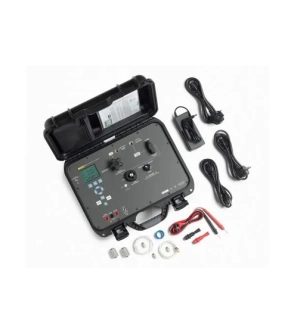
The Fluke 3130-G2M Portable Pressure Calibrator is designed for professionals who demand speed, accuracy, and convenience in pressure calibration. Combining robust pressure generation, high-precision measurement, electrical testing, and exceptional portability, the 3130-G2M delivers a complete solution for field and lab calibration tasks.
Key Features and Benefits
• Integrated Motorized Pump – Say goodbye to manual hand pumps. The powerful, internal motorized pump delivers fast, effortless pressure generation and control, saving time and eliminating operator fatigue.
• Supports Large Volume Applications – Easily connect to an external gas supply, such as plant air, for quick pressurization of large systems. Fine-tune pressure precisely with the built-in variable volume.
• High-Accuracy Pressure Measurement – The onboard sensor provides reliable measurements up to 2 MPa (300 psi, 20 bar) with outstanding accuracy of ±0.025% of reading + 0.01% FS—including all major sources of error.
• Flexible Measurement Range – Expand your capability by connecting Fluke 700P pressure modules, ensuring precision across a wider range of pressures for any application.
• Comprehensive Electrical Measurement – Calibrate pressure transducers and transmitters with built-in support for 4–20 mA and 0–30 V DC measurements. The 3130-G2M can also supply 24 V DC power and source 4–20 mA current, streamlining transmitter testing.
• Rugged, Portable Design – Built tough for the field, the 3130-G2M features a ruggedized case with internal storage for leads, fittings, and power supply. A rechargeable NiMH battery delivers up to 50 hours of operation, or 100 calibrations to 300 psi per charge.
• Simple Battery Recharge – Just plug in with the included universal mains adapter—no special chargers required.
• Seamless Automation and Data Logging – Easily connect to your PC using the Fluke Calibration 700SC Serial Interface Cable and control your calibrator or log data using Fluke Calibration COMPASS for Pressure software.
Designed for True Portability and Productivity
• Lightweight and Compact – Carry the 3130-G2M anywhere; internal storage keeps everything organized and ready for action.
• Field-Ready Power – Up to 50 hours of battery life means you can work longer between charges, with enough power for a full day’s work in demanding environments.
• Easy to Use – Intuitive controls, clear displays, and straightforward operation reduce training time and make every calibration easier.
Automate, Document, and Improve Accuracy
Connect the Fluke 3130-G2M Portable Pressure Calibrator to your PC to automate calibration routines, log results, and enhance traceability. With Fluke COMPASS for Pressure software, you can streamline workflows, improve data integrity, and deliver professional calibration documentation—right from the field.
Experience the convenience, accuracy, and rugged reliability of the Fluke 3130-G2M Portable Pressure Calibrator—your all-in-one solution for pressure calibration, wherever the job takes you.
Key Features
• Measure/generate pressures from vacuum to 2 MPa (300 psi, 20 bar).
• Measure/generate 4 to 20 mA, measures 0 to 30 V DC
• Generate vacuum to -80 kPa (-12 psi, -0.8 bar) or pressure to 2 MPa (300 psi, 20 bar).
• External gas supply up to 2 MPa (300 psi, 20 bar).
• Fine pressure adjustment.
• Measurement accuracy of ± (0.025 % reading + 0.01 % FS).
Key Features and Benefits
• Integrated Motorized Pump – Say goodbye to manual hand pumps. The powerful, internal motorized pump delivers fast, effortless pressure generation and control, saving time and eliminating operator fatigue.
• Supports Large Volume Applications – Easily connect to an external gas supply, such as plant air, for quick pressurization of large systems. Fine-tune pressure precisely with the built-in variable volume.
• High-Accuracy Pressure Measurement – The onboard sensor provides reliable measurements up to 2 MPa (300 psi, 20 bar) with outstanding accuracy of ±0.025% of reading + 0.01% FS—including all major sources of error.
• Flexible Measurement Range – Expand your capability by connecting Fluke 700P pressure modules, ensuring precision across a wider range of pressures for any application.
• Comprehensive Electrical Measurement – Calibrate pressure transducers and transmitters with built-in support for 4–20 mA and 0–30 V DC measurements. The 3130-G2M can also supply 24 V DC power and source 4–20 mA current, streamlining transmitter testing.
• Rugged, Portable Design – Built tough for the field, the 3130-G2M features a ruggedized case with internal storage for leads, fittings, and power supply. A rechargeable NiMH battery delivers up to 50 hours of operation, or 100 calibrations to 300 psi per charge.
• Simple Battery Recharge – Just plug in with the included universal mains adapter—no special chargers required.
• Seamless Automation and Data Logging – Easily connect to your PC using the Fluke Calibration 700SC Serial Interface Cable and control your calibrator or log data using Fluke Calibration COMPASS for Pressure software.
Designed for True Portability and Productivity
• Lightweight and Compact – Carry the 3130-G2M anywhere; internal storage keeps everything organized and ready for action.
• Field-Ready Power – Up to 50 hours of battery life means you can work longer between charges, with enough power for a full day’s work in demanding environments.
• Easy to Use – Intuitive controls, clear displays, and straightforward operation reduce training time and make every calibration easier.
Automate, Document, and Improve Accuracy
Connect the Fluke 3130-G2M Portable Pressure Calibrator to your PC to automate calibration routines, log results, and enhance traceability. With Fluke COMPASS for Pressure software, you can streamline workflows, improve data integrity, and deliver professional calibration documentation—right from the field.
Experience the convenience, accuracy, and rugged reliability of the Fluke 3130-G2M Portable Pressure Calibrator—your all-in-one solution for pressure calibration, wherever the job takes you.
Key Features
• Measure/generate pressures from vacuum to 2 MPa (300 psi, 20 bar).
• Measure/generate 4 to 20 mA, measures 0 to 30 V DC
• Generate vacuum to -80 kPa (-12 psi, -0.8 bar) or pressure to 2 MPa (300 psi, 20 bar).
• External gas supply up to 2 MPa (300 psi, 20 bar).
• Fine pressure adjustment.
• Measurement accuracy of ± (0.025 % reading + 0.01 % FS).
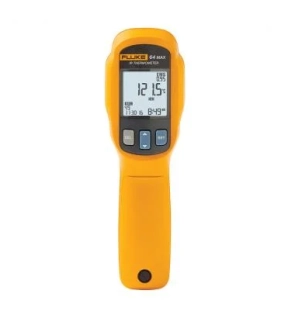
The Fluke 64 MAX thermometer has the precision you need to do the job accurately and won't exceed your budget. Designed and tested to withstand a drop of 3 meters, you can count on this compact and lightweight infrared thermometer to work when you need it in the harshest environments and when you can't get near it.
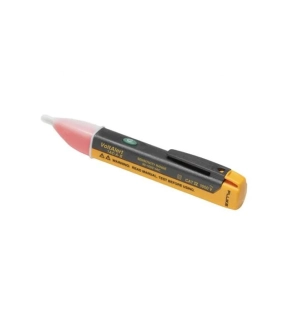
• Be aware of voltage easily - the tip glows red and a beeper sounds when voltage is detected
• Continuous self-test so you always know it’s working
• Voltage detection range for wide application use - 90 V to 1000 V AC or 200 V to 1000 V AC
• Audible/Silent mode for added convenience
• Continuous self-test so you always know it’s working
• Voltage detection range for wide application use - 90 V to 1000 V AC or 200 V to 1000 V AC
• Audible/Silent mode for added convenience